
73 lines
7.2 KiB
Markdown
Executable File
73 lines
7.2 KiB
Markdown
Executable File
|
|
# 4chan X
|
|
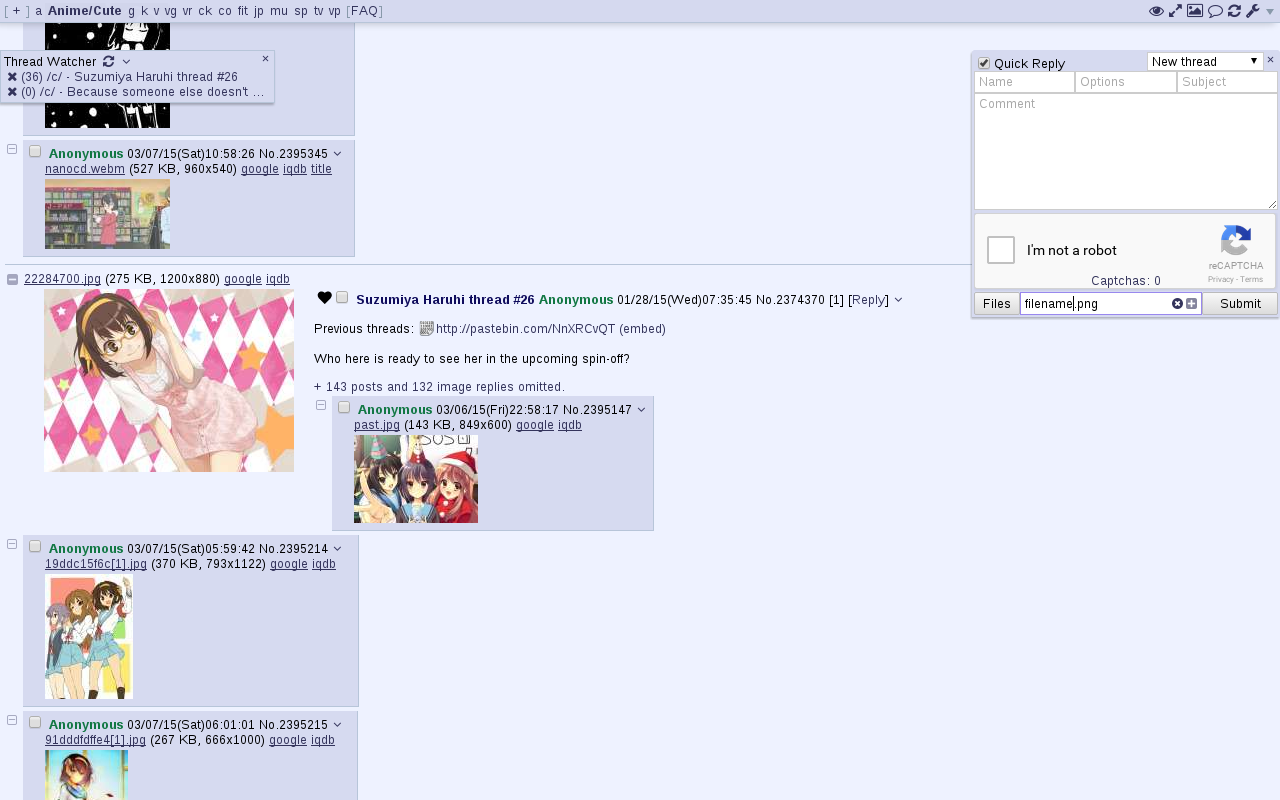
Adds various features to 4chan.
|
|
Previously developed by [aeosynth](https://github.com/aeosynth/4chan-x), [Mayhem](https://github.com/MayhemYDG/4chan-x), [ihavenoface](https://github.com/ihavenoface/4chan-x), [Zixaphir](https://github.com/zixaphir/appchan-x), [Seaweed](https://github.com/seaweedchan/4chan-x), and [Spittie](https://github.com/Spittie/4chan-x), with contributions from many others.
|
|
|
|
If you're looking for a maintained fork of OneeChan (a style script used in addition to 4chan X), try
|
|
https://github.com/Nebukazar/OneeChan.
|
|
|
|
## Firefox version: [Click to Install](https://ccd0.github.io/4chan-x/builds/4chan-X.user.js)
|
|
Install [Greasemonkey](https://addons.mozilla.org/en-US/firefox/addon/greasemonkey/), then click the link above to install 4chan X.
|
|
|
|
Pale Moon users should use [Greasemonkey 1.15](https://addons.mozilla.org/en-US/firefox/addon/greasemonkey/versions/#version-1.15.1-signed). SeaMonkey users should use Greasemonkey 2.3 converted with [this tool](http://addonconverter.fotokraina.com/?url=https://addons.mozilla.org/firefox/downloads/file/282084/greasemonkey-2.3-fx.xpi).
|
|
|
|
**WARNING**:
|
|
If you're switching to this fork from someone else's fork of 4chan X, back up your old script before installing this one as the old one may be overwritten.
|
|
|
|
**Known issues**:
|
|
Greasemonkey 3.0 has a [bug](https://github.com/greasemonkey/greasemonkey/issues/2094) causing 4chan X to open multiple tabs when you open a new tab (for example, when starting a thread). If you're having this problem, [updating](https://addons.mozilla.org/en-US/firefox/addon/greasemonkey/) to Greasemonkey 3.1 or later should fix it.
|
|
|
|
## Chromium version: [Click to Install](https://ccd0.github.io/4chan-x/builds/4chan-X.crx)
|
|
Download the file from the link above and add drag it to your `chrome://extensions` page.
|
|
This should also work for Opera 21+, Chrome dev/canary, and Chrome on platforms other than Windows.
|
|
|
|
**The above will not work in Chrome (stable or beta) on Windows; you must install from the [Chrome store](https://chrome.google.com/webstore/detail/4chan-x/ohnjgmpcibpbafdlkimncjhflgedgpam) as described below.**
|
|
|
|
## Chromium version (Chrome store): [Click to Install](https://chrome.google.com/webstore/detail/4chan-x/ohnjgmpcibpbafdlkimncjhflgedgpam)
|
|
The stable and beta releases of Chrome on Windows will disable extensions not installed from the Chrome store, so users will need to install 4chan X from the link above.
|
|
Only the latest stable version of 4chan X is available.
|
|
|
|
## Other browsers
|
|
4chan X can be used in other browsers, but not all features will work, and you should expect some bugs. In addition, I don't regularly test in these browsers, so updates may occasionally break the script. If this happens, [open an issue](https://github.com/ccd0/4chan-x/issues), and use an old version from the [changelog](https://github.com/ccd0/4chan-x/blob/master/CHANGELOG.md) until it's fixed. You can also try [loadletter's fork](https://github.com/loadletter/4chan-x) if you're having trouble getting this one to work.
|
|
|
|
In several WebKit browsers, there is currently an issue where 4chan X will crash the browser when repeatedly solving the default image-based captchas. Until this is resolved, it is recommended you enable `Use Recaptcha v1` in your settings.
|
|
|
|
- **dwb**: Install the userscripts extension, then save the [script](https://ccd0.github.io/4chan-x/builds/4chan-X.user.js) to the `$XDG_CONFIG_HOME/dwb/greasemonkey` or `$HOME/.config/dwb/greasemonkey` directory (creating it if necessary):
|
|
|
|
dwbem -N -i userscripts
|
|
wget -P ${XDG_CONFIG_HOME:-$HOME/.config}/dwb/greasemonkey https://ccd0.github.io/4chan-x/builds/4chan-X.user.js
|
|
|
|
- **Midori**: Enable `User addons` in your preferences, under the Extensions tab. In the Privacy tab, check `Enable HTML5 local storage support`. Optionally, if you want 4chan X to be able to open new tabs when you start or reply to a thread, you will need to check `Allow scripts to open popups` under the Behavior tab. Then click the link to the [script](https://ccd0.github.io/4chan-x/builds/4chan-X.user.js) to install it.
|
|
|
|
- **Luakit**: Navigate to the [script](https://ccd0.github.io/4chan-x/builds/4chan-X.user.js), then type the command `:usi` to install it.
|
|
|
|
- **uzbl**: Install the script from https://github.com/singpolyma/singpolyma/blob/master/uzbl/data/scripts/userscript.sh, enable it in your config file, and then save [4chan X](https://ccd0.github.io/4chan-x/builds/4chan-X.user.js) to `$XDG_DATA_HOME/uzbl/userscripts` (or `$HOME/.local/share/uzbl/userscripts`).
|
|
|
|
wget -P ${XDG_DATA_HOME:-$HOME/.local/share}/uzbl/scripts https://raw.githubusercontent.com/singpolyma/singpolyma/master/uzbl/data/scripts/userscript.sh
|
|
chmod +x ${XDG_DATA_HOME:-$HOME/.local/share}/uzbl/scripts/userscript.sh
|
|
echo '@on_event LOAD_COMMIT spawn @scripts_dir/userscript.sh document-start' >> ${XDG_CONFIG_HOME:-$HOME/.config}/uzbl/config
|
|
echo '@on_event LOAD_FINISH spawn @scripts_dir/userscript.sh document-end' >> ${XDG_CONFIG_HOME:-$HOME/.config}/uzbl/config
|
|
wget -P ${XDG_DATA_HOME:-$HOME/.local/share}/uzbl/userscripts https://ccd0.github.io/4chan-x/builds/4chan-X.user.js
|
|
|
|
- **Safari**: Install [JS Blocker](http://jsblocker.toggleable.com/), then click the link to the [script](https://ccd0.github.io/4chan-x/builds/4chan-X.user.js) to install it. Be aware that I do not have a practical way of testing the script in Safari at the moment. If you encounter problems, it would be useful to try to reproduce the problem in another browser.
|
|
|
|
## Beta version
|
|
New features and non-urgent bugfixes are released on the beta channel for further testing before they are moved the stable version. Please [report](https://github.com/ccd0/4chan-x/issues) any issues you find, and be sure to mention which version you're using. You should back up your settings regularly to prevent them from being lost due to bugs.
|
|
- [Firefox version](https://ccd0.github.io/4chan-x/builds/4chan-X-beta.user.js)
|
|
- [Chromium version](https://ccd0.github.io/4chan-x/builds/4chan-X-beta.crx)
|
|
|
|
If you want to install the current beta version but get updates from the stable channel after that, install it from [here](https://github.com/ccd0/4chan-x/raw/beta/builds/4chan-X.user.js) for Firefox or [here](https://github.com/ccd0/4chan-x/raw/beta/builds/4chan-X.crx) for Chromium.
|
|
|
|
## Security note
|
|
4chan X currently shares your settings and post history between the HTTP and HTTPS versions of 4chan. If you are concerned about protecting your privacy against a man-in-the-middle attack, you should disable 4chan X on the HTTP version of 4chan and/or install [HTTPS Everywhere](https://www.eff.org/https-everywhere).
|
|
|
|
## Uninstalling
|
|
4chan X disables the native extension, so if you uninstall 4chan X, you'll need to re-enable it. To do this, click the `[Settings]` link in the top right corner and uncheck "`Disable the native extension`" in the panel that appears.
|
|
|
|
## More information
|
|
- [Changelog](https://github.com/ccd0/4chan-x/blob/master/CHANGELOG.md)
|
|
- [Frequently Asked Questions](https://github.com/ccd0/4chan-x/wiki/Frequently-Asked-Questions)
|
|
- [Report Bugs](https://github.com/ccd0/4chan-x/issues)
|
|
- [Contributing](https://github.com/ccd0/4chan-x/blob/master/CONTRIBUTING.md)
|
|
|