
52 lines
4.5 KiB
Markdown
Executable File
52 lines
4.5 KiB
Markdown
Executable File
|
|
# 4chan X
|
|
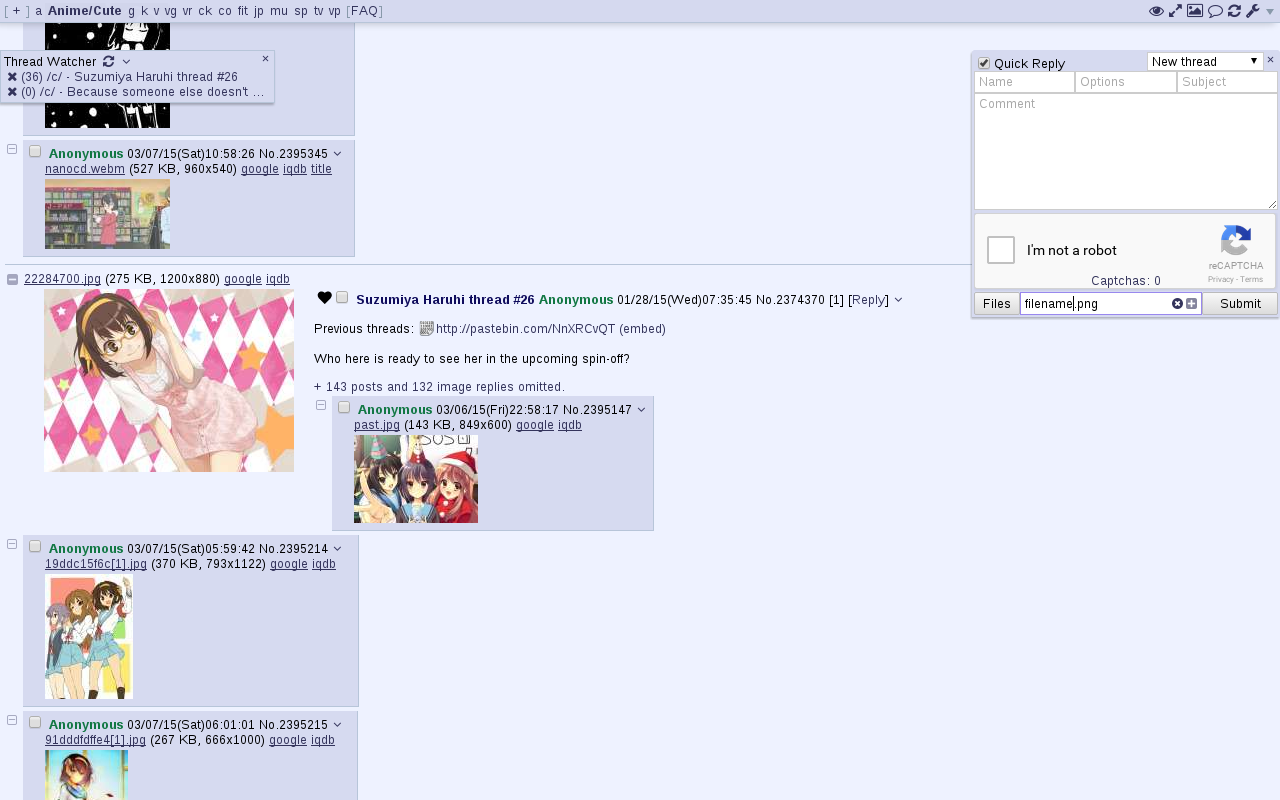
Adds various features to 4chan.
|
|
Previously developed by [aeosynth](https://github.com/aeosynth/4chan-x), [Mayhem](https://github.com/MayhemYDG/4chan-x), [ihavenoface](https://github.com/ihavenoface/4chan-x), [Zixaphir](https://github.com/zixaphir/appchan-x), [Seaweed](https://github.com/seaweedchan/4chan-x), and [Spittie](https://github.com/Spittie/4chan-x), with contributions from many others.
|
|
|
|
If you're looking for a maintained fork of OneeChan (a style script used in addition to 4chan X), try
|
|
https://github.com/Nebukazar/OneeChan.
|
|
|
|
## Firefox version: [Click to Install](https://ccd0.github.io/4chan-x/builds/4chan-X.user.js)
|
|
Install [Greasemonkey](https://addons.mozilla.org/en-US/firefox/addon/greasemonkey/), then click the link above to install 4chan X. If you're using a fork of Firefox (e.g. Pale Moon), you may need to use [Greasemonkey 1.15](https://addons.mozilla.org/en-US/firefox/addon/greasemonkey/versions/#version-1.15) instead of the most recent version.
|
|
|
|
**WARNING**:
|
|
If you're switching to this fork from someone else's fork of 4chan X, back up your old script before installing this one as the old one may be overwritten.
|
|
|
|
**Known issues**:
|
|
Greasemonkey 3.0 has a [bug](https://github.com/greasemonkey/greasemonkey/issues/2094) causing 4chan X to open multiple tabs when you open a new tab (for example, when starting a thread). If you're having this problem, [updating](https://addons.mozilla.org/en-US/firefox/addon/greasemonkey/) to Greasemonkey 3.1 or later should fix it.
|
|
|
|
## Chromium version: [Click to Install](https://ccd0.github.io/4chan-x/builds/4chan-X.crx)
|
|
Download the file from the link above and add drag it to your `chrome://extensions` page.
|
|
This should also work for non-Windows/dev/canary Chrome and Chromium-based versions of Opera.
|
|
|
|
**The above will not work in Chrome (stable or beta) users on Windows; you must install from the [Chrome store](https://chrome.google.com/webstore/detail/4chan-x/ohnjgmpcibpbafdlkimncjhflgedgpam).**
|
|
|
|
## Chromium version (Chrome store): [Click to Install](https://chrome.google.com/webstore/detail/4chan-x/ohnjgmpcibpbafdlkimncjhflgedgpam)
|
|
The stable and beta releases of Chrome on Windows will disable extensions not installed from the Chrome store, so users will need to install 4chan X from the link above.
|
|
Only the latest stable version of 4chan X is available.
|
|
|
|
## Other browsers
|
|
This fork of 4chan X is not guaranteed to work correctly in other browsers, but you are welcome to try your luck. Pull requests to fix the bugs you will likely find are always welcome. You may fare better with [loadletter's fork](https://github.com/loadletter/4chan-x), which has fewer features but less dependence on browser-specific APIs.
|
|
|
|
- [Installing 4chan X in dwb](https://github.com/ccd0/4chan-x/wiki/Installing-4chan-X-in-dwb)
|
|
|
|
## Beta version
|
|
New features and non-urgent bugfixes are released on the beta channel for further testing before they are moved the stable version. Please [report](https://github.com/ccd0/4chan-x/issues) any issues you find, and be sure to mention which version you're using. You should back up your settings regularly to prevent them from being lost due to bugs.
|
|
- [Firefox version](https://ccd0.github.io/4chan-x/builds/4chan-X-beta.user.js)
|
|
- [Chromium version](https://ccd0.github.io/4chan-x/builds/4chan-X-beta.crx)
|
|
|
|
If you want to install the current beta version but get updates from the stable channel after that, install it from [here](https://github.com/ccd0/4chan-x/raw/beta/builds/4chan-X.user.js) for Firefox or [here](https://github.com/ccd0/4chan-x/raw/beta/builds/4chan-X.crx) for Chromium.
|
|
|
|
## Security note
|
|
4chan X currently shares your settings and post history between the HTTP and HTTPS versions of 4chan. If you are concerned about protecting your privacy against a man-in-the-middle attack, you should disable 4chan X on the HTTP version of 4chan and/or install [HTTPS Everywhere](https://www.eff.org/https-everywhere).
|
|
|
|
## Uninstalling
|
|
4chan X disables the native extension, so if you uninstall 4chan X, you'll need to re-enable it. To do this, click the `[Settings]` link in the top right corner and uncheck "`Disable the native extension`" in the panel that appears.
|
|
|
|
## More information
|
|
- [Changelog](https://github.com/ccd0/4chan-x/blob/master/CHANGELOG.md)
|
|
- [Frequently Asked Questions](https://github.com/ccd0/4chan-x/wiki/Frequently-Asked-Questions)
|
|
- [Report Bugs](https://github.com/ccd0/4chan-x/issues)
|
|
- [Contributing](https://github.com/ccd0/4chan-x/blob/master/CONTRIBUTING.md)
|
|
|