 567a1fe45e
- cca085e60090ca21edf0dee6aa012fc4c949809a
  start of import/export

- f816da146c32f010476872d15b58ec8301b9fdf2
  start of changing stuff until I can get a bundle

- c92adde147792356ff206107b2311590e8b2c054
  first bundle without errors

- e652dd2b785e355e0ac33566da7eaaaa19c7c539
  Bundling works with ts files

- 60fdb2539a757ca2f66258b21adf81246873893f
  meta info in compilation

- 8ccae783cbf65ac186d5669dedd9f945f7608694
  new build doesn't cause errors on page load as userscript

- 6fa11c42a05572779870f94b7ef4ea8dac373450
  work in progress: load userscript in browser and fix bugs

- b15c557d483de544a38a28cb78f25139d1d8421f
  migrated yotsuba templates to plain js

  the old templates caused some variable be in a wrong scope after
decaffeinate, causing them to be unreadable from the old template

  the old templates caused some variable be in a wrong scope after
decaffeinate, causing them to be unreadable from the old template

- 9d763e852fde74808ca14d5a8d6be45f51ae2765
  update readme

- 924eda8268bcfc4f1c0a83062ecd1d0d65bd92aa
  added more imports, and now the circular dependencies are haunting me

- ddd2d23315d801c7deaa28313833e667698aadd3
  jsx templates for escaped strings,
  more bug fixed from circular dependencies

- fee484dd447820d908c77b1e9d31235ab95a481c
  some fixes, clarify jsx

- e1d01d02eba5db2f604a5df786c525e95f32a2f9
  Unpacked extension
  more fixes

- 97d9090b712d20f7d851c82af84c65060f1a9c6e
  fixed class on post that caused catalog to appear empty

- 96a2c7b4a1e69f5812d1e53b2e4c90f6d8447b02
  A child class that's not supposed to run the parents constructor? That needs a workaround in es6 classes.

- fc06b4e1b2769550d4c69377b84d3ccacdb2e013
  changed jsx to make the tests pass

- 7b317b2a0feabe8caa547c76baf0c908b21592f1
  revert archive and banners to json
4chan X
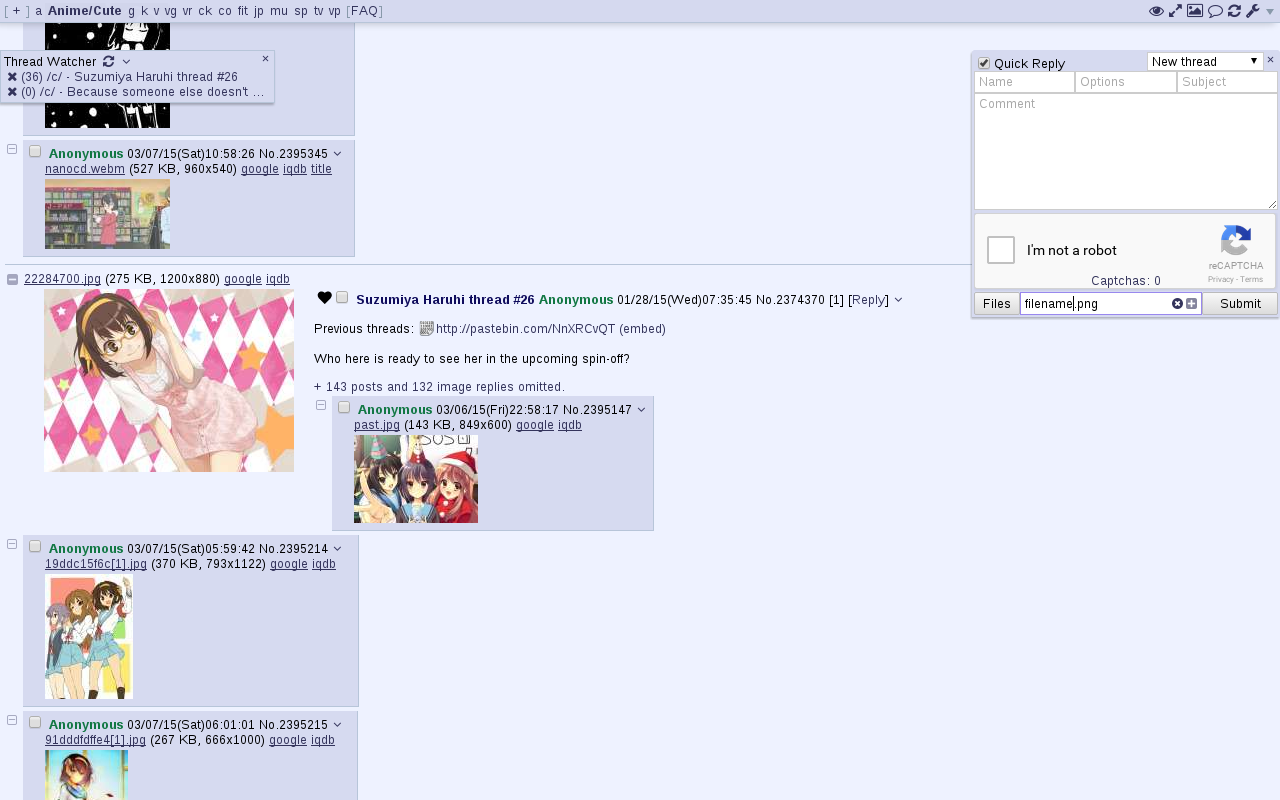
4chan X is a script that adds various features to anonymous imageboards. It was originally developed for 4chan but has no affiliation with it.
It was previously developed by aeosynth, Mayhem, ihavenoface, Zixaphir, Seaweed, and Spittie, with contributions from many others.
If you're looking for a maintained fork of OneeChan (a style script used in addition to 4chan X), try https://github.com/KevinParnell/OneeChan.
Please note
Uninstalling: 4chan X disables the native extension, so if you uninstall 4chan X, you'll need to re-enable it. To do this, click the [Settings] link in the top right corner, uncheck "Disable the native extension" in the panel that appears, and click the "Save Settings" button. If you don't see a "Save Settings" button, it may be being hidden by your ad blocker.
Private browsing: By default, 4chan X remembers your last read post in a thread and which posts were made by you, even if you are in private browsing / incognito mode. If you want to turn this off, uncheck the Remember Last Read Post and Remember Your Posts options in the settings panel. You can clear all 4chan browsing history saved by 4chan X by resetting your settings.
Use of the "Link Title" feature to fetch titles of Youtube links is subject to Youtube's Terms of Service and Privacy Policy. For more details on what information is sent to Youtube and other sites, and how to turn it off if you don't want the feature, see 4chan X's privacy documentation.
Install
Firefox
Install Violentmonkey, Tampermonkey, or Greasemonkey (issues since v4: #2526, #2576), then click here to install 4chan X.
Ports of Greasemonkey are available for SeaMonkey and Pale Moon.
Chromium
Userscript: Install Violentmonkey or Tampermonkey, then click here to install 4chan X.
Chrome extension: 4chan X is also available as a standalone Chrome extension. The Chrome extension has the additional feature of being able to sync your settings and data with other devices via Chrome Sync. But there is an issue when the script updates: Whenever the Chrome extension is updated, until you hard refresh (F5) the tab, 4chan X is unable to save any data (such as posts marked as yours and settings changes). The userscript version above does not have this problem when 4chan X updates, only when Violentmonkey / Tampermonkey is updated. To install as a Chrome extension:
- Chromium, Vivaldi: Download 4chan X, then open
chrome://extensionsand drag the downloaded file onto the page. Alternatively, you can install 4chan X from the Chrome store. - Opera: Click to install 4chan X, then follow the prompts to activate it in your extension manager.
- Chrome: Install 4chan X from the Chrome store.
Note: This version of 4chan X does not work with Opera 12. If you need Opera 12 support, try loadletter's fork instead.
Safari
Install the Userscripts extension. Enable it by pressing ⌘,, navigating to the extensions pane and checking Userscripts checkbox. Now open the Userscripts editor by clicking on the </> button in the taskbar. Then click on the + button and select the New Javascript option. Replace the default text with the contents of the 4chan X script. Finally save it by pressing ⌘s.
WebKitGTK+ / QtWebKit / QtWebEngine
Several minimal browsers have support for userscripts and can run 4chan X. Due to the lack of the cross-site GM_* API, and lack of support for userscripts in iframes, not all features will work. You may experience crashes when repeatedly solving the default image-based captchas. You can avoid this problem by enabling Use Recaptcha v1 in your settings.
-
dwb: Install the userscripts extension, then save the script to the
$XDG_CONFIG_HOME/dwb/greasemonkeyor$HOME/.config/dwb/greasemonkeydirectory (creating it if necessary):dwbem -N -i userscripts wget -P ${XDG_CONFIG_HOME:-$HOME/.config}/dwb/greasemonkey https://www.4chan-x.net/builds/4chan-X.user.js -
Midori: Enable
User addonsin your preferences, under the Extensions tab. In the Privacy tab, checkEnable HTML5 local storage support. Optionally, if you want 4chan X to be able to open new tabs when you start or reply to a thread, you will need to checkAllow scripts to open popupsunder the Behavior tab. Then click the link to the script to install it. -
Luakit: Navigate to the script, then type the command
:usito install it. -
uzbl: Install the script from https://github.com/singpolyma/singpolyma/blob/master/uzbl/data/scripts/userscript.sh, enable it in your config file, and then save 4chan X to
$XDG_DATA_HOME/uzbl/userscripts(or$HOME/.local/share/uzbl/userscripts). The commands below assume you have run uzbl at least once to create its config file.wget -P "${XDG_DATA_HOME:-$HOME/.local/share}/uzbl/scripts" https://raw.githubusercontent.com/singpolyma/singpolyma/master/uzbl/data/scripts/userscript.sh chmod +x "${XDG_DATA_HOME:-$HOME/.local/share}/uzbl/scripts/userscript.sh" echo '@on_event LOAD_COMMIT spawn @scripts_dir/userscript.sh document-start' >> "${XDG_CONFIG_HOME:-$HOME/.config}/uzbl/config" echo '@on_event LOAD_FINISH spawn @scripts_dir/userscript.sh document-end' >> "${XDG_CONFIG_HOME:-$HOME/.config}/uzbl/config" wget -P "${XDG_DATA_HOME:-$HOME/.local/share}/uzbl/userscripts" https://www.4chan-x.net/builds/4chan-X.user.js -
qutebrowser: Save the script to the
$XDG_DATA_HOME/qutebrowser/greasemonkeyor$HOME/.local/share/qutebrowser/greasemonkeydirectory:wget -P ${XDG_DATA_HOME:-$HOME/.local/share}/qutebrowser/greasemonkey https://www.4chan-x.net/builds/4chan-X.user.js
MS Edge
Install Tampermonkey, then click here to install 4chan X.
Other browsers
4chan X can be used in some browsers that do not support userscripts using a local proxy. Not all features will work.
Beta version
New features and non-urgent bugfixes are released on the beta channel for further testing before they are moved the stable version. Please report any issues you find, and be sure to mention which version you're using. You should back up your settings regularly to prevent them from being lost due to bugs.
To install the beta version and get updates whenever there's a new beta version:
- Install userscript (use with Greasemonkey / Violentmonkey / Tampermonkey / JS Blocker / etc.)
- Download Chrome extension (download and drag to
chrome://extensions)
To install the current beta version but get updates from the stable channel (for example, if just you want a particular recent feature):
Troubleshooting
If you encounter a bug, try the steps here, then report it to the issue tracker. If the bug seems to be caused by a script update, you can install a old version from the changelog.